
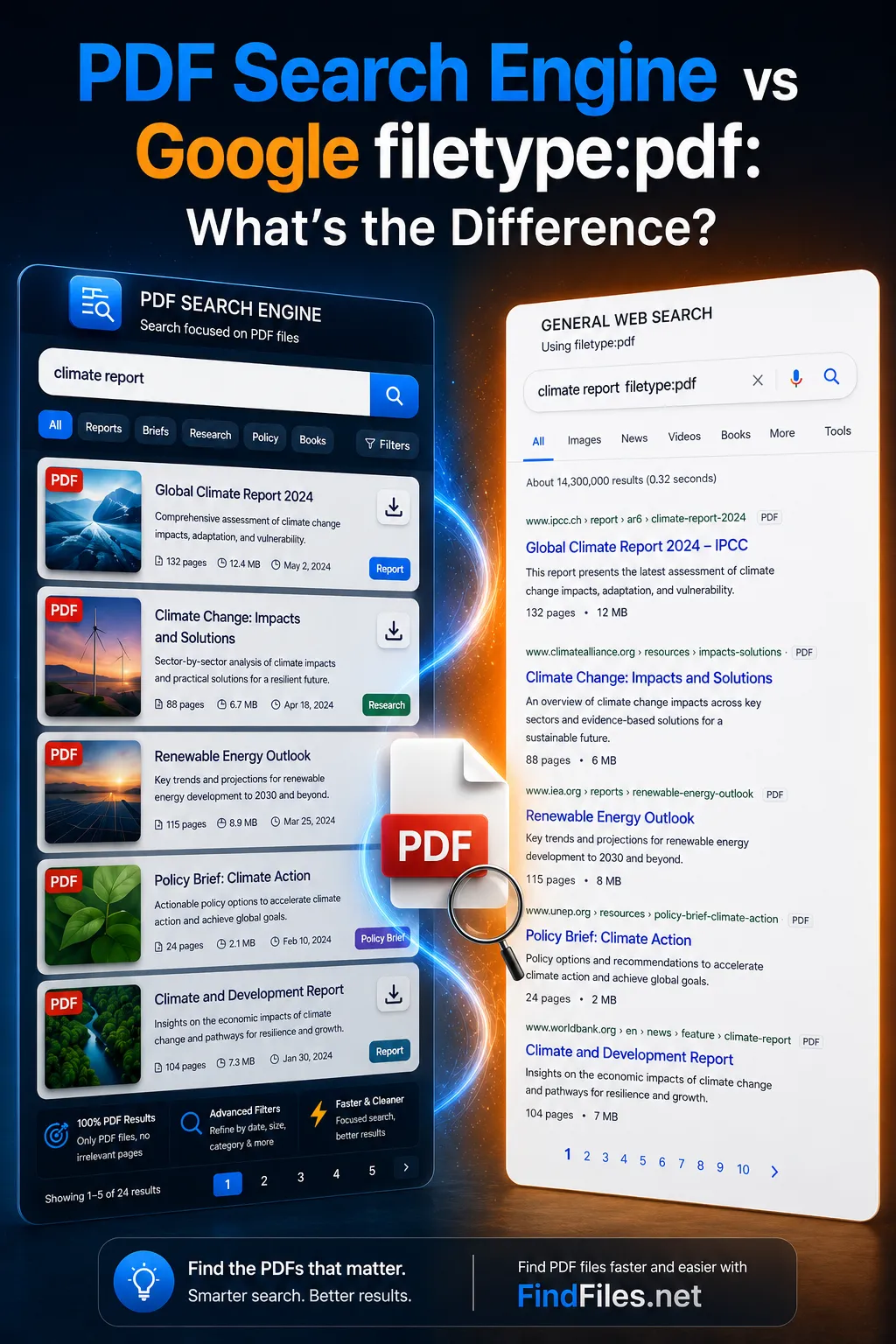

Searching for a PDF is not the same as searching for a normal web page. A person looking for a public report, form, manual, academic paper, or dataset often wants the document itself, not a page that happens to mention the document.
This distinction explains why both Google filetype:pdf and a dedicated PDF search engine can be useful. They solve related problems, but they start from different assumptions about what the user is trying to find.
"Google filetype:pdf narrows a web search. A PDF search engine starts from the file."
What is Google filetype:pdf?
Google filetype:pdf is a search operator. It tells Google that the result should be a PDF document. A query such as climate report filetype:pdf asks Google to search its index for pages or resources that match the topic and are associated with the PDF format.
The operator is useful because it adds a file constraint to an otherwise broad web search. Without it, a query for a report may return news articles, summaries, landing pages, publisher pages, product pages, or documents in many formats. With filetype:pdf, the search intent becomes clearer.
However, Google remains a general web search engine. Its ranking systems are built around relevance signals from pages, links, domains, and user intent. Files can appear directly, but they are still evaluated in a web-centered environment. That means the surrounding site, the linking page, the title Google extracts, and the general authority of the source can influence what appears.
This is often enough for quick tasks. If a user already knows the organization, the exact title, or a distinctive phrase, Google filetype:pdf can work well. It is especially helpful when the document is popular, widely linked, and indexed with enough context for Google to understand it.
What is a PDF Search Engine?
A PDF search engine is a file-focused search system that treats the PDF as the primary search object. Instead of starting with web pages and narrowing them down by file type, it starts with indexed public files and helps users search public PDF files more directly.
This changes the search model. The user is not asking for pages about a report, pages linking to a form, or pages describing a manual. The user is asking for the file. For public documents, government forms, technical manuals, academic papers, and data reports, that distinction can save time.
FindFiles.net follows this file-first approach. It indexes publicly accessible files on the open web and exposes them through search pages such as the PDF search engine, the broader document search engine, and the search by file type guide. For users who already understand Google operators, the Google filetype search alternative page explains the same shift from operator-based filtering to direct file discovery.
A dedicated file search engine does not make general web search obsolete. It addresses a narrower problem: how to find PDF files online when the file itself matters more than the web page that mentions it.
Main Differences Between Both Approaches
The central difference is the starting point. Google begins with the web and lets the user add a file constraint. A PDF search engine begins with files and makes format-aware discovery part of the normal workflow.
| Need | Google filetype:pdf | Dedicated PDF search engine |
|---|---|---|
| Search model | General web search narrowed by an operator. | File search where PDFs are first-class results. |
| User intent | Works when the query and source are already clear. | Works when the goal is to browse or discover public PDFs directly. |
| Result focus | May mix direct PDFs with pages that contain or reference PDFs. | Prioritizes direct file-focused results and file properties. |
| Useful formats | Each format must be expressed through syntax such as filetype:pdf. | Format filtering is part of the search experience. |
| Best use | Known documents, known organizations, and popular PDFs. | Research, manuals, forms, reports, academic papers, and datasets. |
The table does not imply that one approach is always better. It shows why the right tool depends on whether the user is primarily searching the web or searching files.
When Each Approach Is Useful
When Google filetype:pdf is useful
Google filetype:pdf is useful when the search target is already well defined. If a user knows the title of a government document, the publisher, the agency name, or a phrase from the PDF, the operator can reduce noise quickly.
It is also practical when the search is part of a broader research workflow. A user may begin with articles, news, institutional pages, and summaries, then add filetype:pdf when the task shifts toward the original document. In that case, the PDF constraint is one step inside a wider web search.
This works well for visible documents: annual reports from large organizations, widely cited academic papers, official forms on authoritative websites, or product manuals from major brands. These documents usually have enough surrounding context for a general search engine to rank them effectively.
When a dedicated PDF search engine is better
A dedicated PDF search engine is better when the file is the destination from the beginning. This is common in research, compliance work, procurement, education, technical support, and public administration.
Researchers may need PDF reports, white papers, conference material, government documents, or academic papers from many sources. Citizens may need public forms, policy documents, budgets, permits, and local government publications. Technicians may need installation manuals, service guides, data sheets, and troubleshooting documents. Analysts may need datasets, annexes, statistical releases, or methodology PDFs.
In these cases, the search problem is not only relevance. It is discoverability. Public PDFs can exist without strong page context, without a descriptive title, and without many links. A filetype PDF alternative such as FindFiles.net is built for this situation: find files online first, then evaluate whether the file is useful.
Example Searches
Practical search queries should describe the topic and the expected file format. In Google, this usually means writing the operator manually. In FindFiles.net, users can either search from the PDF-focused page or include the filetype in the query.
For reports, a useful query is annual report filetype:pdf. This can help locate corporate reports, nonprofit reports, public-sector reports, and recurring publications.
For technical documentation, user manual filetype:pdf is a broad starting point. It can be refined with a product name, model number, manufacturer, or topic.
For public policy and environmental research, climate report filetype:pdf can surface PDF reports from agencies, research groups, companies, and institutions.
For academic discovery, research paper filetype:pdf is a simple query, but it becomes stronger when combined with a field, method, author name, or institution.
For data-related work, dataset filetype:pdf can find documentation, data dictionaries, methodology notes, and PDF reports that accompany public datasets.
For administration and everyday tasks, application form filetype:pdf can help locate public forms, templates, brochures, and printable documents. A query such as government report filetype:pdf is useful when the source is public but the exact agency or title is not yet known.
Safety Tips When Downloading PDF Files
Public PDFs should be treated with the same caution as any other downloadable file. The fact that a document is publicly reachable does not automatically mean it is current, official, complete, or safe.
Check the source before downloading. Government documents should usually come from government domains or clearly affiliated public repositories. Manuals should come from manufacturer, distributor, or established support sources. Academic papers should be checked against the publisher, repository, author page, or institution when accuracy matters.
Review the file name, size, and context. A realistic PDF title, a plausible file size, and a source page that matches the subject are useful signals. Extremely small files, unrelated file names, strange redirects, or documents that do not match the query should be treated carefully.
Keep software updated. Modern PDF readers include security protections, but outdated readers and browser plugins can still create risk. When handling unfamiliar documents, avoid enabling scripts, macros, external content, or embedded attachments unless the source is trusted.
FindFiles.net indexes publicly accessible files and applies safety-oriented filtering, but users should still evaluate documents before relying on them. Search can improve access; it cannot replace source judgment.
Conclusion
Google filetype:pdf is a useful operator. It helps narrow a general web search when the user wants PDF documents instead of ordinary pages. For many known-document searches, it is fast, familiar, and effective.
A dedicated PDF search engine solves a different problem. It is built for users who want to search public PDF files directly, compare file results, and find PDF files online without turning every search into an operator exercise.
The practical choice is simple: use Google when the wider web context matters, and use a file-focused tool when the document itself is the target. For research, government documents, manuals, forms, reports, academic papers, and datasets, that file-first workflow can be the more direct path.
To search PDF files with FindFiles.net, start with the PDF search engine or use the main search with a query such as safety manual filetype:pdf.